참고 :
IBM Developer Site
JavaScript Object Notation (JSON)과 Asynchronous JavaScript + XML (Ajax)은 나란히 성장하고 있습니다. JSON은 JavaScript 객체로 바뀔 수 있는 데이터를 쉽게 전송할 수 있지만, 이 객체를 다루기 위해 커스텀 스크립팅이 필요합니다. JsonML은 JSON의 확장으로, JSON 유형 마크업을 사용하여 XML 데이터를 매핑하고, 이는 JSON 마크업에 기반하여 XML이나 XHTML 데이터를 쉽게 생성할 수 있고 사용자 인터페이스(UI) 엘리먼트를 쉽게 구현 및 교환할 수 있도록 합니다. 이 글에서, 이 편리한 툴을 사용법을 설명합니다
Ajax로 데이터 교환하기
Ajax 인터페이스가 가진 가장 일반적인 문제들 중 하나는 클라이언트 브라우저와 호스트 서버 간 정보 교환에 인코딩 및 사후 처리(post-processing) 또는 데이터 스트림을 JavaScript 애플리케이션 내에서 직접 사용할 수 있는 것으로 변환하는 파싱이 필요하다는 점이다.
Ajax에서, 캡슐화 방식은 XML이다. 전 세계적인 공통 이해를 기반으로 사용되고 있지만 문제와 한계도 안고 있다. XML의 기본적인 문제는 인코딩 프로세스가 비싸고, 대부분의 브라우저에서, XML 응답의 디코딩(decoding)에 시간이 많이 든다는 점이다.
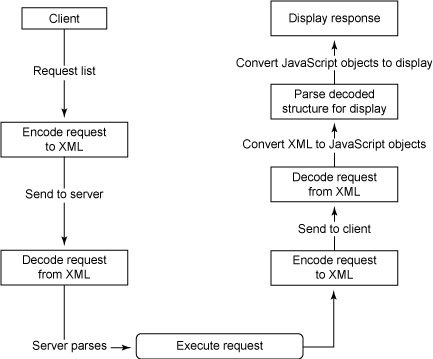
Ajax 애플리케이션을 사용하면, 요청은 폼의 콘텐트에 기반하게 된다. 응답은 서버에 의해 리턴되는 정보가 자바 객체 시리즈로 표현된다. 결과 시퀀스는 그림 1과 비슷하다.
그림 1. 전형적인 Ajax 프로세스
그림 1의 프로세스는 두 가지 문제를 갖고 있다.
- 첫 번째는 XML로 작동하는 것이 매우 복잡하다. XML을 처음부터 생성하든, 서버에서 XML을 소비하든, 프로세스는 시간이 많이 걸리고 지루하고, 대게는 비효율적이다.
- 다른 문제는 데이터를 디스플레이 포맷으로 변환하는 것이 복잡하다는 점이다. DOM 모델을 사용하여 직접 UI 엘리먼트를 구현하든지, 사전 포맷된 XHTML로 데이터를 제공해야 한다. 후자 방식은 서버가 UI 엘리먼트를 제공해야 한다. (이 자체로 위험한 발상이다.) 전자는 오버헤드를 프로세스에 추가하게 된다.
DOM 모델은 다른 웹 브라우저들과 환경이 다른 DOM 구조와 인터페이스를 갖고 있다는 사실에도 영향을 받는다. 이는 여러분이 로딩하는 정보의 디스플레이에도 복잡성을 추가하게 되고, 이는 전혀 원하던 바가 아니다.
이러한 문제에 대한 솔루션이 많이 있다. 첫 번째 솔루션은 XML 포맷에서 JSON으로 데이터가 교환되는 방식을 변경하는 것이다. 이 부분은 이 글의 초점은 아니지만, JSON을 이해하면 JsonML을 더욱 쉽게 이해할 수 있을 것이다. JsonML은 정보의 실제 디스플레이를 더욱 쉽게 만드는 또 다른 솔루션도 제공한다. 먼저 JSON부터 보도록 하자.
JSON 이해하기
JavaScript Object Notation (JSON)은 XML 사용, 콘텐트의 파싱, JavaScript 표준 기능을 사용하여 정보를 교환함으로써 가용성 있는 내부 구조로의 변환을 통해 대부분의 문제를 해결하려고 한다.
JSON의 중심은 여전히 텍스트 포맷이지만, 가독성이 더욱 강화되었고, 많은 언어들(Perl, PHP, Python, Java, Ruby)로 중첩된 데이터 객체들을 생성하는 방식과 호환되고, 이는 JavaScript 객체 포맷(중첩된 데이터 구조)와 잘 맞는다.
Listing 1처럼, XML로 비즈니스 리스트를 모델링 한다.
Listing 1. XML 주소 데이터
<business>
<name>One on Wharf</name>
<address>
    <street>1 Wharf Road</street>
    <town>Grantham</town>
    <county>Lincolnshire</county>
</address>
<phonenumbers>
    <phone>01476 123456</phone>
    <phone>01476 654321</phone>
</phonenumbers>
</business>
|
JavaScript 내에서 파싱 하려면 DOM 모델을 사용하여 컴포넌트에 액세스 해야 한다. 예를 들어, JavaScript 내 이 구조에서 전화 번호를 얻으려면, Listing 2의 코드를 사용해야 한다.
Listing 2. XML 데이터를 소비하는 웹 애플리케이션
<html>
<head>
<script type="text/javascript">
var xmlDoc;
function loadXML()
{
// code for IE
if (window.ActiveXObject)
  {
  xmlDoc=new ActiveXObject("Microsoft.XMLDOM");
  xmlDoc.async=false;
  xmlDoc.load("/json/address.xml");
  getaddress();
  }
// code for Mozilla, Firefox, Opera, etc.
else if (document.implementation &&
document.implementation.createDocument)
  {
  xmlDoc=document.implementation.createDocument("","",null);
  xmlDoc.load("/json/address.xml");
  xmlDoc.onload=getaddress;
  }
else
  {
  alert('Your browser cannot handle this script');
  }
}
function getaddress()
{
document.getElementById("business").innerHTML=
xmlDoc.getElementsByTagName("name")[0].childNodes[0].nodeValue;
document.getElementById("phone").innerHTML=
xmlDoc.getElementsByTagName("phone")[0].childNodes[0].nodeValue;
document.getElementById("fax").innerHTML=
xmlDoc.getElementsByTagName("phone")[1].childNodes[0].nodeValue;
}
</script>
</head>
<body onload="loadXML()">
<h1>Address</h1>
<p><b>Business</b> <span id="business"></span><br />
<b>Phone:</b> <span id="phone"></span><br />
<b>Fax:</b> <span id="fax"></span>
</p>
</body>
</html>
|
Listing 2의 코드는 단 1 개의 주소 정보만 얻었고, 다음 로직을 사용하여 비즈니스 이름 같은 원래의 XML 문서 엘리먼트에 액세스 한다. xmlDoc.getElementsByTagName("name")[0].childNodes[0].nodeValue.
좋아 보이지는 않는다!
JSON에서 같은 정보를 보자. (Listing 3)
Listing 3. JSON 버전의 주소 데이터
{
    "business" : {
        "name" : "One on Wharf",
        "address" : {
            "street" : "1 Wharf Road",
            "town" : "Grantham",
            "county" : "Lincolnshire",
        },
        "phonenumbers" : [
                          "01476 123456",
                          "01476 654321",
                          ]
                      }
}
|
구조가 훨씬 읽기 쉽고 간단하다. JSON에 사용된 마크업 포맷은 eval()을 사용하여 파서 없이도 JavaScript에서 직접 계산될 수 있다. 그리고 결과는 또 다른 JavaScript 객체이다: var addressbookObj = eval('(' + jsontext + ')');.
주: 이상적으로는 eval()을 사용해서는 안된다. 임의의 텍스트를 실행하는데 사용될 수 있기 때문이다. JSON 텍스트만 파싱하는 많은 JSON 파서들이 있다.
정보가 JavaScript 내 객체라면, 표준 JavaScript 표기법을 사용하여 정보에 액세스 할 수 있다. 예를 들어, 객체로 파싱 되었던 JSON 데이터 소스에서 같은 이름과 전화 번호를 얻을 수 있다. (Listing 4)
Listing 4. 객체로 파싱된 JSON 데이터 소스
addressbookObj.business.name
addressbookObj.business.phonenumbers[0]
addressbookObj.business.phonenumbers[1]
|
Listing 4는 사용하고 액세스 하기가 더욱 간단하고 쉽다. 위 데이터 구조를 사용하고 원래의 XML 예제와 같은 정보를 제공하는 전체 페이지를 작성할 수 있다. (Listing 5)
Listing 5. JSON 데이터를 소비하는 웹 애플리케이션
<html>
<head>
<script type="text/javascript" src="prototype.js"></script>
<script type="text/javascript">

function showaddress(req)
{
    var addressbookObj = eval('(' + req.responseText + ')');

    document.getElementById("business").innerHTML =
       addressbookObj.business.name;
    document.getElementById("phone").innerHTML =
       addressbookObj.business.phonenumbers[0];
    document.getElementById("fax").innerHTML =
       addressbookObj.business.phonenumbers[1];
}

function getaddress()
{
   new Ajax.Request('address.json',
                    { method : 'get',
                      onSuccess : showaddress,
                      onFailure: function(){
              alert('Something went wrong...') }});
}
</script>
</head>
<body onload="getaddress()">
<h1>Address</h1>
<p><b>Business:</b> <span id="business"></span><br />
<b>Phone:</b> <span id="phone"></span><br />
<b>Fax:</b> <span id="fax"></span>
</p>
</body>
</html>
|
필자는 여기에서 Prototype 라이브러리를 사용하여 원래 JSON 파일을 로딩했지만, JSON 파일에 있는 정보를 실제로 파싱하고 디스플레이 하는 프로세스가 훨씬 더 간단하다는 것을 알 수 있다. 하지만, 여전히 DOM을 사용하여 JSON 파일에서 로딩되었던 정보로 아웃풋을 채워야 한다.
원래 JSON으로 돌아가서, JSON은 전송되는 데이터의 관점에서 볼 때 비교적 작고, 더 큰 Ajax 프로젝트에서 XML의 페이로드 오버헤드는 상당하다. 실제로 콘텐트를 처리하는 감소된 JavaScript 오버헤드와 이것을 합병할 때 오버헤드가 크다.
Listing 5의 예제는 JSON 표준의 단순함을 보여준다. 대부분의 Ajax 애플리케이션의 핵심은 정보 디스플레이의 커스터마이징이다. 이 예제에서, 여러분은 DOM 모델을 사용하여 XML 또는 JSON 데이터 콘텐트를 HTML 페이지로 삽입했다. 많은 Ajax 애플리케이션에서, 구현해야 할 더 복잡한 사용자 인터페이스 엘리먼트가 있다.
JsonML
JSON Markup Language는 JSON 데이터 교환 포맷의 기본 방식을 사용하고 이를 XML 표현에 적용하여 비슷한 텍스트 기반 마크업을 사용하여 XML 포맷 데이터를 교환할 수 있다.
XML을 직접 사용하는 대안으로서 XML 데이터를 모델링 하는 표기법 포맷으로 보인다. 하지만, 원래의 XML과 비교해서 JSON의 구조와 가독성을 생각해 보라. JsonML에서, 많은 장점들을 활용할 수 있다. 가독성과 데이터 크기는 분명한 이점이 된다.
JsonML의 주 초점은 UI 엘리먼트를 구현하는 툴로서이다. 전통적으로, 여러분은 이러한 종류의 브라우저 기반 사용자 인터페이스를 개발하는 두 가지 방식을 갖고 있다.
- 서버에서 XHTML을 생성하여 DOM 객체의
innerHTML 애트리뷰트를 사용하여 현재 페이지로 삽입한다.
- 클라이언트 DOM 인터페이스를 사용하여 DOM 구조를 직접 구현한다.
여러분도 보다시피, 이것은 다소 성가신 방법이다. 대형 데이터 세트의 경우, 포맷팅이라는 반복적인 특성이 프로세스를 혼돈시킬 수 있다. 게다가, 브라우저에 민감한 DOM 구현들을 다루는 문제도 있다.
바로 이것이 JsonML이 해결하고자 하는 것이다. JSON 마크업의 단순함과 대상 포맷으로서 DOM을 혼합한다. 여러분은 같은 효과를 볼 수 있다. 소스는 JavaScript 클라이언트에 의해 쉽게 로딩 및 파싱될 수 있다. (DOM 구현에 대해서는 걱정할 필요가 없다.) 또한, 여러분은 JsonML 문서에 모든 것을 기술할 수 있기 때문에, 데이터와 마크업을 하나의 파일로 효과적으로 삽입할 수 있다.
그림 1로 다시 돌아가면, Ajax 인터페이스를 통해 복원된 정보를 디스플레이 하는 전형적인 방식에는 데이터를 요청하고, XML을 파싱하고, XML을 브라우저에서 요구하는 DOM 구조로 변환하고, 아웃풋을 실제로 디스플레이 하는 것이 포함된다.
JsonML을 사용하여, 전체 XML, XHTML, DOM, JavaScript 단계를 하나의 단계로 대체할 수 있다.
JsonML 마크업
JsonML 예제를 보기 전에, JsonML의 구조부터 살펴보자. 이 구조의 공식 포맷은 Listing 6과 같다.
Listing 6. JsonML 마크업 포맷
element
    = '[' tag-name ',' attributes ',' element-list ']'
    | '[' tag-name ',' attributes ']'
    | '[' tag-name ',' element-list ']'
    | '[' tag-name ']'
    | json-string
    ;
tag-name
    = json-string
    ;
attributes
    = '{' attribute-list '}'
    | '{' '}'
    ;
attribute-list
    = attribute ',' attribute-list
    | attribute
    ;
attribute
    = attribute-name ':' attribute-value
    ;
attribute-name
    = json-string
    ;
attribute-value
    = json-string
    ;
element-list
    = element ',' element-list
    | element
    ;
|
복잡해 보이지만, 기본 구조는 매우 간단하다.
모든 엘리먼트는 텍스트이기 때문에 [ "ul" ] 같은 un-numbered list 엘리먼트를 만들 수 있다.
대괄호는 엘리먼트를 논리적으로 그룹핑 한다. 애트리뷰트를 이 엘리먼트에 추가하려면, 이 그룹 안에서 리스트의 다음 엘리먼트로서 중괄호를 사용한다. 예를 들어, 스타일을 변경하려면 다음과 같이 한다: [ "ul", { style : "list-style-type:none"} ].
물론, 이 리스트는 자식이 없이는 소용이 없다. 이들은 같은 리스트에 추가 엘리먼트로서 추가된다. (Listing 7)
Listing 7. 자식이 있는 리스트
[ "ul", { style : "list-style-type:none"},
    [ "li",
      "First item"],
    [ "li",
      "Second item"],
    [ "li",
      "Third item"],
    ];
|
아이템에 대한 애트리뷰트는 선택적이기 때문에, 생략할 수 있다. (Listing 7)
JsonML을 XHTML로 파싱하기
위 예제는 JSON이기 때문에, JavaScript 애플리케이션 내에서 정의할 수 있다. 콘텐트를 XHTML로서 디스플레이 하는 객체로 파싱하려면, JsonML 웹 사이트에서 JsonML 라이브러리를 가져온다. JsonML에서 JSON 객체를 XHTML로 파싱하려면 parseJsonML() 메소드를 사용한다. JsonML이 파싱되면, 페이지에 추가할 수 있는 UI 엘리먼트로서 액세스 할 수 있다.
Listing 8은 제공된 링크를 클릭할 때 마다 불리트(bulleted) 리스트를 사전 정의된 컨테이너에 추가할 전체 웹 페이지 모습이다.
Listing 8. JsonML 템플릿을 디스플레이 하는 웹 애플리케이션
<html>
<head>
<script type="text/javascript" src="JsonML.js"></script>
<script type="text/javascript">

var listblock = [ "ul",
                  [ "li",
                    "First item"],
                  [ "li",
                    "Second item"],
                  [ "li",
                    "Third item"],
                  ];

function addblock (id,jsonmlblock)
{
    var aselement = listblock.parseJsonML();
    var container = document.getElementById(id);
    container.appendChild(aselement);
}

</script>
</head>
<body>
<a href"#list" onclick="addblock('container',
 listblock);return false;">Add block</a>
<div id="container"/>
</body>
</html>
|
그림 2는 웹 페이지 실행 모습이다. 페이지로 반입된 불리트 리스트와 함께 2회 정도 링크가 클릭된 후 보여지는 보습이다.
그림 2. JSON 예제 실행 모습

예제를 단계 별로 살펴보자. 첫 번째 블록은 리스트 아이템을 나타내는 JsonML이다. (Listing 9)
Listing 9. 리스트 아이템을 나타내는 JsonML
var listblock = [ "ul",
                  [ "li",
                    "First item"],
                  [ "li",
                    "Second item"],
                  [ "li",
                    "Third item"],
                  ];
|
이것은 단순한 JavaScript 객체이다. 사용자가 링크를 클릭하면, addblock() 함수가 호출된다. 단 세 단계만 거친다. 첫 단계는 JavaScript 객체를 XHTML로 파싱하는 것이다. parseJsonML() 메소드를 적용한다: var aselement = jsonmlblock.parseJsonML();.
이제 목적지 컨테이너를 얻는다: var container = document.getElementById(id);.
마지막으로, 생성된 XHTML을 추가하고 이를 컨테이너에 붙인다: container.appendChild(aselement);.
기존 XHTML이나 XML을 JsonML로 파싱하기
JsonML을 사용하는 애플리케이션을 구현하기 전에, JsonML로 변환하고자 하는 XML 또는 XHTML 구조가 있어야 한다. JsonML 사이트(참고자료)에서는 XML 소스에서 JsonML을 만들어 내는 XSL 변형을 제공한다.
이를 사용하려면, JsonML.xsl 변형을 다운로드 한 다음, xsltproc을 사용하여 변환을 수행한다. Listing 10의 XML 구조를 보자.
Listing 10. XML 구조
<table class="maintable">
<tr class="odd">
<th>Situation</th>
<th>Result</th>
</tr>
<tr class="even">
<td><a href="driving.html" title="Driving">Driving</a></td>
<td>Busy</td>
</tr>
...
</table>
|
Listing 10을 JsonML로 변환할 수 있다: $ xsltproc JsonML.xsl.xml samp.xml.
결과 아웃풋은 Listing 11에 나타나 있다. 실제 아웃풋 내에 스트링 엘리먼트로서 보존되었지만 XSL이 아웃풋에서는 새로운 라인을 제거했다.
Listing 11. 결과 아웃풋
["table",
 {"class":"maintable"},
 "\n",
 ["tr",
  {"class":"odd"},
  "\n",
  ["th",
   "Situation"],
  "\n",
  ["th",
   "Result"],
  "\n"],
 "\n",
 ["tr",
  {"class":"even"},
  "\n",
  ["td",
   ["a",
    {"href":"driving.html",
     "title":"Driving"},
    "Driving"]],
  "\n",
  ["td",
   "Busy"],
  "\n"],
 ]
|
이 메소드를 사용하여 어떤 구조라도 XML에서 JsonML로 변환할 수 있다.
기존 DOM 구조를 JsonML로 파싱하기
또 다른 상황은 XML 또는 XHTML 블록을 구현하고 이를 JsonML로 변환해야 하는 상황이다. 변환에 JavaScript 함수를 사용할 수 있다. JsonML 웹 사이트를 참조하라.
UI 빌더로서 JsonML 사용하기
여러 가지 방식으로, UI 빌더로서 JsonML을 사용할 수 있다. 한 가지 쉬운 방법은 구현하고자 하는 UI로서 작동하는 JsonML에 JavaScript 구조를 만드는 것이다. JavaScript 구조를 구현하면, 한 가지 액션에 있는 구조를 XHTML로 변환하고 생성된 XHTML을 이 페이지에 삽입한다. Listing 12는 테이블의 행에 검은 셀 또는 흰 셀을 추가할 수 있고, 행을 테이블에 추가하고, 테이블을 만드는 테이블 셀용 UI 빌더를 나타내고 있다. 이것은 JsonML 소스 및 상응하는 XHTML 소스이다.
Listing 12. JsonML 기반 테이블 빌더
<html>
<head>
<script type="text/javascript" src="JsonML.js"></script>
<script type="text/javascript">

var blackcell = [ "td", {"style" : "background-color:black"},"CELL"];
var whitecell = [ "td", {"style" : "background-color:white"},"CELL"];

var currentrow = new Array();
var currenttable = new Array();

function onLoad()
{
    initrow();
    inittable();
}

function initrow()
{
    currentrow = new Array();
    currentrow.push("tr");
}

function inittable()
{
    currenttable = new Array();
    currenttable.push("table");
    currenttable.push({"border" : "1"});
}

function addrow()
{
    currenttable.push(currentrow);
    currentrow = new Array();
    currentrow.push("tr");
    showsource();
}

function addcell(color)
{
    if (color == "black")
        {
            currentrow.push(blackcell);
        }
    else
        {
            currentrow.push(whitecell);
        }
}

function showsource()
{
    var tablelement = currenttable.parseJsonML();
    var container = document.getElementById("viewabletable");
    container.removeChild(container.lastChild);
    container.appendChild(tablelement);

    var srccontainer = document.getElementById("sourceoutput");
    srccontainer.value = currenttable.toSource();

    var domcontainer = document.getElementById("domsourceoutput");
    domcontainer.value = container.innerHTML;
 }

function showtable()
{
    showsource();
    initrow();
    inittable();
}

</script>
</head>
<body onload="onLoad()">
<a href"#addrow" onclick="addrow();return false;">Add Row</a><br/>
<a href"#addbcell" onclick="addcell('black');return false;"
  >Add Black Cell</a><br/>
<a href"#addwcell" onclick="addcell('white');return false;"
  >Add White Cell</a><br/>
<a href"#showtable" onclick="showtable();return false;"
  >Show Table</a><br/>
<a href"#showsource" onclick="showsource();return false;"
  >Show Source</a><br/>

<div id="viewabletable">
</div>
<b>JsonML Source</b>
<textarea rows="20" cols="120" id="sourceoutput"></textarea><br/>
<b>DOM Source</b>
<textarea rows="20" cols="120" id="domsourceoutput"></textarea><br/>

</body>
</html>
|
이 애플리케이션의 연산은 매우 단순하다. Add Black/White Cell 버튼을 클릭할 때마다, JsonML 포맷에 올바른 정보(이 경우, 올바른 텍스트와 포맷팅을 가진 테이블 셀)로 채워진 어레이를 현재 행을 구성하는 어레이에 추가한다. Add Row를 클릭하면, 그 행과 관련된 어레이를 전체 테이블과 관련된 어레이로 추가하게 된다. 각각의 경우, JsonML 표기법에 내부 객체의 정의를 확장한다.
Show Table을 클릭하면, 내부 JavaScript 구조가 XHTML로 파싱되어 parseJsonML() 메소드를 사용하는 테이블을 디스플레이 하여 원래 JsonML을 렌더링 된 포맷으로 변환한다. 또한, JsonML 소스(JavaScript 객체에 toSource() 메소드 사용)를 디스플레이 하고, 생성된 XHTML 소스를 덤핑함으로써 XHTML 소스를 디스플레이 한다. 여러분은 내부 JavaScript 구조만 다루기 때문에, DOM 인터페이스를 사용하여 HTML을 생성할 필요가 없다. XHTML을 최종 문서로 삽입하는 것을 제외하고는 말이다.
정적 텍스트 엘리먼트를 사용하여 테이블을 구현했지만, 이것이 행으로 삽입되기 전에 테이블 데이터를 변경할 수 있다. JsonML 템플릿은 단순한 JavaScript 객체이기 때문에, 간단한 할당을 사용하여 콘텐트를 업데이트 할 수 있다: blackcell[2] = "Some other content";.
이 템플릿의 콘텐트는 쉽게 업데이트 되기 때문에 복잡한 UI 구현 프로세스의 한 부분이 제거되었다. (Ajax 연결을 통해 여러분이 로딩한 정보를 디스플레이에 사용된 XHTML로 변환하는 방법)
Behaviors를 JsonML 엘리먼트에 바인딩 하기
위 예제(Listing 12)는 매우 간단한 메소드를 제공하여 동등한 XHTML을 생성하는데 사용되는 내부 구조를 사용하여 테이블을 생성한다. 하지만, 특정 스타일에 맞도록 아웃풋을 변경하거나, 현재 페이지 내에서 사용할 수 있는 스타일 및 아웃풋 가이드라인과 매치하도록 기존 템플릿을 변경해야 한다면?
JsonML을 사용하는 한 가지 방법은 로딩 시 페이지로 반입하는 UI 템플릿을 생성하는 것이다. (Listing 13)
Listing 13. 로딩 시, UI 템플릿을 생성하는 JsonML
<script type="text/javascript" src="resultstable.js"></script>
<script type="text/javascript" src="resultline.js"></script>
<script type="text/javascript" src="resultselectionpopup.js"></script>
|
이제 페이지의 다른 엘리먼트를 만들어 내기 위해, 각 객체를 로딩하고, parseJsonML을 사용하여 이를 XHTML로 변환하고, 결과를 만들어 낸다. 지금까지 CSS가 사용되었지만, Listing 13의 방식은 어떤 유형의 정보나 데이터를 아웃풋에 도입하는 방법을 제공하지 않는다.
전통적인 Ajax/DOM 모델에서, 각 엘리먼트를 개별적으로 파싱하고 다른 엘리먼트들을 적용할 시기와 장소를 선택할 수 있기 때문에 이러한 결정들을 내릴 수 있다. 같은 방식으로 JsonML 파싱 프로세스와 상호 작동 할 수 없지만, 콜백 바인딩을 파싱 단계에 추가할 수 있다. 이 단계에서는 각 엘리먼트를 파싱하고 결과를 낸다.
바인딩 함수는 JsonML 소스에서 생성된 각 XHTML 태그에 대해 실행되고, 아이템은 표준 HTML 객체이기 때문에, 비교 또는 결정 메소드를 사용하여 템플릿의 아웃풋을 변경할 수 있다.
예를 들어, Listing 14는 또 다른 JsonML 포맷 테이블을 보여준다.
Listing 14. 테이블용 JsonML 템플릿
var table = ["table",{ "border" : "1" },
             ["tr",
              ["td",{"class" : "highlight-effect"},"Highlighted row"],
              ],
             ["tr",
              ["td",{"class" : "non-highlight"},"Non-Highlighted row"],
              ],
             ];
|
파싱될 때 이것은 간단한 테이블을 생성한다. 여러분은 CSS 클래스를 사용하여 원하는 포맷팅을 제공한다. 하지만, 테이블에 삽입하고자 하는 데이터에 중요한 것이 들어있을 때에만 행을 강조하고 싶을 수도 있다.
이렇게 하려면, 엘리먼트를 하이라이트 효과 클래스로 바꾸는 바인딩 함수를 작성하여 다른 배경색을 갖도록 한다. (Listing 15)
Listing 15. 바인딩 함수를 JsonML 템플릿에 추가하기
function actionbindings(elem) {
    if (elem.className.indexOf("highlight-effect") >= 0) {
        elem.style.backgroundColor = "red";
    }
    return elem;
}
|
바인딩을 사용하려면, 바인딩 함수를 parseJsonML() 함수에 제공한다: var renderedtable = table.parseJsonML(actionbindings);.
바인딩 함수는 원래 JsonML에서 포맷된 것처럼 엘리먼트로 완전히 액세스 할 수 있기 때문에 바인딩은 태그 이름, 클래스 이름, ID 같은 많은 애트리뷰트를 기반으로 포맷을 검사 및 변경할 수 있다. 여러분이 해야 할 일은 이것을 파서로 리턴하기 전에 엘리먼트를 수정하여 변경된 엘리먼트를 DOM 트리에 삽입하는 것이다.
JsonML과 XML
비록 이 글이 XHTML에 대한 솔루션으로서 JsonML의 사용에 초점을 맞춰 설명한 것이지만, 거의 모든 XML 데이터에도 JsonML을 사용할 수 있다. XHTML은 메인 XML 표준의 하위 세트이기 때문이다.
이 장치는 정적인 XML 조각들을 JavaScript 애플리케이션에 저장해야 할 경우 유용하지만, 애플리케이션이 정보를 다른 클라이언트와 교환할 때 문서를 XML로 교환하는 기능을 갖고 있다.
특히, JsonML은 JavaScript 내 구조로서 액세스 할 수 있으므로, XML 구조의 콘텐트를 쉽게 업데이트 하고 이를 서버로 보낼 수 있다.
Listing 16처럼 간단한 XML 구조의 예를 들어보자.
Listing 16. XML 구조
<name>
<firstname>Martin</firstname>
<lastname>Brown</lastname>
</name>
|
JsonML에서, 이것은 Listing 17처럼 생성된다.
Listing 17. JsonML 구조
["name",
  ["firstname", "Martin"],
  ["lastname", "Brown"],
]
|
JavaScript 객체로서 여러분은 상세를 업데이트 할 수 있다. (Listing 18)
Listing 18. JavaScript로 업데이트 하기
address[1][1] = "Sharon";
|
parseJsonML()을 사용하여 XML 버전의 객체를 생성하여 Listing 19에서 보이는 것을 만든다.
Listing 19. parseJsonML이 XML 버전의 객체를 생성한다.
<name>
<firstname>Sharon</firstname>
<lastname>Brown</lastname>
</name>
|
위 프로세스는 DOM 파서를 사용하여 XML 구조를 생성하거나, 텍스트 조작(남용 및 실수 여지가 많음)을 사용하는 것 보다 훨씬 단순하다. 각 경우 기본 템플릿은 작고 즉각적으로 액세스 가능하다.
요약
Ajax 애플리케이션을 사용하면 많은 문제들이 야기된다. 데이터를 효과적으로 교환하는 방법, 애플리케이션에 데이터를 디스플레이 하기 위해 포맷하는 방법 등이 문제가 된다. Ajax 애플리케이션의 정보는 동적이고, 이 정보를 포맷하는데 사용되는 XHTML을 구현해야 한다. XHTML을 직접 작성하기에는 시간이 오래 걸리고 DOM 모델을 사용하면 문제가 많이 생긴다. DOM 인터페이스는 브라우저 구현들마다 다르기 때문이다.
JsonML은 JSON을 기반으로 구현되고 JavaScript 표기법을 사용하여 사용자 인터페이스 엘리먼트를 모델링 할 수 있다. 따라서 XHTML이나 DOM 기반 엘리먼트를 직접 생성하는 것 보다 훨씬 구현하기가 쉽고 호환성도 높다. JavaScript 구조를 XHTML로 변환할 때에는 DOM 인터페이스나 차이를 걱정할 필요가 없다.
이 글에서는 JSON과 JsonML 표준의 기초를 설명했고, 이들을 쉽게 업데이트 하는 방법도 설명했다. 또한 JsonML을 사용하여 UI 엘리먼트를 구현하는 방법도 다루었다. 파싱 단계 동안 프로세싱을 함으로써 JsonML 콘텐트를 확장하는 방법과 XHTML 아웃풋 방식을 확장 및 강화하는 방법도 배웠다.
참고자료
- JSON 홈페이지
- JsonML 홈페이지
- Ajax 마스터하기, Part 10: 데이터 전송에 JSON 사용하기 (한글) (Brett McLaughlin, 한국 developerWorks, 2007년 5월): JSON에 대해 알아보고, 이것이 애플리케이션에서 데이터와 객체들을 어떻게 이동시키는지를 설명한다.
- JSON 캐시 (Bakul L. Patel, developerWorks, 2006년 10월): 클라이언트 측에서 JSON을 사용하여 밸리데이션 메타데이터를 캐시하고, 밸리데이션 데이터와 로직을 구별해 본다.
- XML에서 JSON을 생성하여 Ajax 사용하기 (Jack D Herrington, developerworks, 2006년 9월): XSLT V2를 사용하여 XML 데이터를 XML data into JavaScript Object Notation (JSON)으로 변환하기.
- XML 기술 자료: 한국 developerWorks XML 존에서 광범위한 기술 자료, 팁, 튜토리얼, 표준, IBM 레드북을 볼 수 있다.
- developerWorks 기술 이벤트와 웹캐스트
- technology bookstore


 nexCalendar.js
 parse_demo.zip


 invalid-file
 IE전용인줄 알았던 window.showModalDialog 로 먹는것이 아닌가?